
Localhorst
Keks-Verteiler
- Registriert
- 12 Nov. 2014
- Beiträge
- 1.650
You do not have permission to view link please Anmelden or Registrieren
Und wenn du den Regkey via GPO verteilst?
Follow along with the video below to see how to install our site as a web app on your home screen.
Anmerkung: This feature may not be available in some browsers.


# Deaktivieren des Windows Defenders
Set-MpPreference -DisableRealtimeMonitoring $true
# Deaktivieren der Windows Firewall
Set-NetFirewallProfile -Enabled False
# Anlegen des Ordners StartLayout unter c:\
New-Item -Name "StartLayout" -ItemType Directory -Path "C:\"
# Kopieren der XML-Datei in den neuerstellten Ordner
copy-item c:\temp\StartLayout.xml c:\StartLayout
# Verzeichniswechsel
cd c:\temp\lgpo
# Import der GPOs
.\lgpo.exe /g c:\temp\StartLayout
# Deinstallieren XBOX-App
Get-AppxPackage -AllUsers *xbox* | Remove-AppxPackage
# Deinstallieren Spiele
Get-AppxPackage *solitairecollection* | Remove-AppxPackage
Get-appxpackage *king.com* | Remove-AppxPackage
Get-appxpackage *hiddenCity* | Remove-AppxPackage
Get-AppxPackage *empires* | Remove-AppxPackage
Get-AppxPackage *bubblewitch* | Remove-AppxPackage
Get-AppxPackage *minecraft* | Remove-AppxPackage
# Deinstalliere unnötige Windows-Apps
Get-AppxPackage -AllUsers *YourPhone* | Remove-AppxPackage
Get-AppxPackage -AllUsers *officehub* | Remove-AppxPackage
Get-AppxPackage -AllUsers *getstarted* | Remove-AppxPackage
Get-AppxPackage -AllUsers *bingnews* | Remove-AppxPackage
Get-AppxPackage -AllUsers *bingweather* | Remove-AppxPackage
Get-AppxPackage -AllUsers *zunemusic* | Remove-AppxPackage
Get-AppxPackage -AllUsers *ScreenSketch* | Remove-AppxPackage
Get-AppxPackage -AllUsers *zunevideo* | Remove-AppxPackage
Get-AppxPackage -AllUsers *windowsmaps* | Remove-AppxPackage
Get-AppxPackage -AllUsers *onenote* | Remove-AppxPackage
Get-AppxPackage -AllUsers *3dbuilder* | Remove-AppxPackage
Get-AppxPackage -AllUsers *3dview* | Remove-AppxPackage
Get-AppxPackage -AllUsers *autodesksketch* | Remove-AppxPackage
Get-AppxPackage -AllUsers *print3d* | Remove-AppxPackage
Get-AppxPackage -AllUsers *phototastic* | Remove-AppxPackage
Get-AppxPackage -AllUsers *soundrecorder* | Remove-AppxPackage
Get-AppxPackage -AllUsers *windowscamera* | Remove-AppxPackage
Get-AppxPackage -AllUsers *messaging* | Remove-AppxPackage
Get-AppxPackage -AllUsers *communicationsapps* | Remove-AppxPackage
Get-AppxPackage -AllUsers *feedbackhub* | Remove-AppxPackage
Get-AppxPackage -AllUsers *oneconnect* | Remove-AppxPackage
Get-AppxPackage -AllUsers *keeper* | Remove-AppxPackage
Get-AppxPackage -AllUsers *skypeapp* | Remove-AppxPackage
Get-AppxPackage -AllUsers *facebook* | Remove-AppxPackage
Get-AppxPackage -AllUsers *twitter* | Remove-AppxPackage
Get-AppxPackage -AllUsers *cookingfever* | Remove-AppxPackage
Get-AppxPackage -AllUsers *gethelp* | Remove-AppxPackage
Get-AppxPackage -AllUsers *webmediaextension* | Remove-AppxPackage
Get-AppxPackage -AllUsers *wallet* | Remove-AppxPackage
Get-AppxPackage -AllUsers *xing* | Remove-AppxPackage
Get-AppxPackage -AllUsers *MixedReality.Portal* | Remove-AppxPackage
# Entfernen von Verknüpfungen im StartMenu und dem Desktop
Remove-Item "C:\Users\$env:USERNAME\AppData\Roaming\Microsoft\Windows\Start Menu\Programs\OneDrive*"
Remove-Item "C:\ProgramData\Microsoft\Windows\Start Menu\Programs\Windows Media Player*"
Remove-Item "C:\Users\*\Desktop\*Edge*" -Force
# Importieren der Registry Keys
cd c:\temp\registry\
regedit /s Anmeldungsbild_deaktivieren.reg
regedit /s Appvorschlaege_deaktivieren.reg
regedit /s Benachrichtigungen_Deaktivieren.reg
regedit /s Sucheicon_deaktivieren.reg
regedit /s Taskansicht_deaktivieren.reg<LayoutModificationTemplate
xmlns:defaultlayout="http://schemas.microsoft.com/Start/2014/FullDefaultLayout"
xmlns:start="http://schemas.microsoft.com/Start/2014/StartLayout" Version="1"
xmlns="http://schemas.microsoft.com/Start/2014/LayoutModification"
xmlns:taskbar="http://schemas.microsoft.com/Start/2014/TaskbarLayout">
<LayoutOptions StartTileGroupCellWidth="6" />
<DefaultLayoutOverride>
<StartLayoutCollection>
<defaultlayout:StartLayout GroupCellWidth="6" />
</StartLayoutCollection>
</DefaultLayoutOverride>
<CustomTaskbarLayoutCollection PinListPlacement="Replace">
<defaultlayout:TaskbarLayout>
<taskbar:TaskbarPinList>
<taskbar:DesktopApp DesktopApplicationLinkPath="#leaveempty"/>
</taskbar:TaskbarPinList>
</defaultlayout:TaskbarLayout>
</CustomTaskbarLayoutCollection>
</LayoutModificationTemplate> esktopApplicationTile Size="2x2" Column="0" Row="0" DesktopApplicationLinkPath="%APPDATA%\Microsoft\Windows\Start Menu\Programs\Accessories\Internet Explorer.lnk" />esktopApplicationTile Size="2x2" Column="2" Row="0" DesktopApplicationLinkPath="%APPDATA%\Microsoft\Windows\Start Menu\Programs\System Tools\File Explorer.lnk" />
 askbarLayout>askbarPinList>esktopApp DesktopApplicationLinkPath="%APPDATA%\Microsoft\Windows\Start Menu\Programs\Accessories\Internet Explorer.lnk" />esktopApp DesktopApplicationLinkPath="%APPDATA%\Microsoft\Windows\Start Menu\Programs\System Tools\File Explorer.lnk" />askbarPinList>askbarLayout>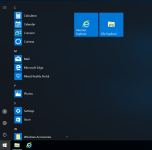
# Deinstallieren Spiele
Get-AppxPackage *solitairecollection* | Remove-AppxPackage
Get-appxpackage *king.com* | Remove-AppxPackage
Get-appxpackage *hiddenCity* | Remove-AppxPackage
Get-AppxPackage *empires* | Remove-AppxPackage
Get-AppxPackage *bubblewitch* | Remove-AppxPackage
Get-AppxPackage *minecraft* | Remove-AppxPackage
#
Get-AppxPackage -AllUsers *xing* | Remove-AppxPackage