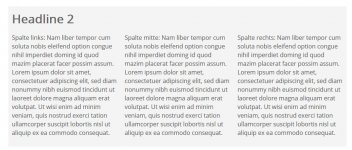
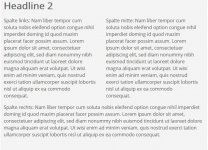
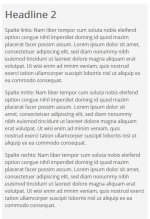
Teste bzw. spiele gerade etwas mit responsive Designs herum. Wollte nun mal ein dreispaltiges Layout probieren. Habe folgendes getestet:
[src=html5]<div id="pagewrap">
<div id="head"> </div>
<div id="blah"></div>
<div id="cont2">
<h1>Headline 2 </h1>
<section id="left_column">
<p>links: Test</p>
</section>
<section id="middle_column">
<p>mitte: Lorem Ipsum</p>
</section>
<section id="right_column">
<p>rechts: La le su</p>
</section>
</div>
<div id="blubb"></div>
</div>[/src]
mit folgender CSS
[src=css]
#left_column {
width: 280px;
float: left;
padding-right: 20px;
}
#middle_column {
width: 280px;
float: left;
padding-right: 20px;
}
#right_column {
width: 280px;
float: left;
}
@media screen and (max-width: 900px) {
#pagewrap {
width: 94%;
}
#left_column {
width: 41%;
padding-right: 2%;
}
#middle_column {
width: 41%;
padding-left: 2%;
float: right;
}
#right_column {
clear: both;
width: auto;
float: none;
}
}
@media screen and (max-width: 600px) {
#left_column {
width: auto;
float: none;
}
#middle_column {
width: auto;
float: none;
}
#right_column {
width: auto;
float: none;
}
}
@media screen and (max-width: 480px) {
h1 {
font-size: 2em;
}
#left_column {
float: none;
margin-left:0px;
}
#middle_column {
float: none;
margin-left:0px;
}
#right_column {
float: none;
margin-left:0px;
}
}
[/src]
Funktioniert soweit auch gut. Nur bei kleinen Größen ist da noch ein Abstand rechts links von der mittleren Spalte. Aber wieso?

Kann mir wer mal kurz auf die Sprünge helfen?
Gruß godlike
[src=html5]<div id="pagewrap">
<div id="head"> </div>
<div id="blah"></div>
<div id="cont2">
<h1>Headline 2 </h1>
<section id="left_column">
<p>links: Test</p>
</section>
<section id="middle_column">
<p>mitte: Lorem Ipsum</p>
</section>
<section id="right_column">
<p>rechts: La le su</p>
</section>
</div>
<div id="blubb"></div>
</div>[/src]
mit folgender CSS
[src=css]
#left_column {
width: 280px;
float: left;
padding-right: 20px;
}
#middle_column {
width: 280px;
float: left;
padding-right: 20px;
}
#right_column {
width: 280px;
float: left;
}
@media screen and (max-width: 900px) {
#pagewrap {
width: 94%;
}
#left_column {
width: 41%;
padding-right: 2%;
}
#middle_column {
width: 41%;
padding-left: 2%;
float: right;
}
#right_column {
clear: both;
width: auto;
float: none;
}
}
@media screen and (max-width: 600px) {
#left_column {
width: auto;
float: none;
}
#middle_column {
width: auto;
float: none;
}
#right_column {
width: auto;
float: none;
}
}
@media screen and (max-width: 480px) {
h1 {
font-size: 2em;
}
#left_column {
float: none;
margin-left:0px;
}
#middle_column {
float: none;
margin-left:0px;
}
#right_column {
float: none;
margin-left:0px;
}
}
[/src]
Funktioniert soweit auch gut. Nur bei kleinen Größen ist da noch ein Abstand rechts links von der mittleren Spalte. Aber wieso?
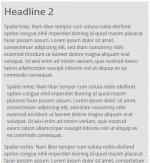
Kann mir wer mal kurz auf die Sprünge helfen?
Gruß godlike
Zuletzt bearbeitet:

 Links von der mittleren Spalte ist der Abstand. Optische Täuschung fällt also schon mal raus


 Ich bin erst frisch in dem Thema, hab ich einfach übersehen...