

Hey, ich bräuchte mal wieder einen kleinen Denkanstoß von euch  Habe heute eine kleine Änderung beauftragt bekommen und stehe etwas auf dem Schlauch. Habe hier 3 Div-Container. Ein mal ein Video, ein mal Text (kommt aus ner DB) und eine Google-Maps-Karte. Momentan ist der Aufbau wie folgt:

Der Dazugehörige Quellcode ist (im Kurzen) wie folgt:
[src=html4strict]<!DOCTYPE html>
<html xmlns="http://www.w3.org/1999/xhtml">
<head>
<meta http-equiv="Content-Type" content="text/html; charset=utf-8" />
<meta name="viewport" content="initial-scale=1.0, user-scalable=no" />
<style type="text/css">
body {
padding-top: 25px;
padding-bottom: 25px;
font-family: Verdana, Geneva, sans-serif;
background-color: #CCC;
}
h3 {
margin: 0px;
padding: 0px;
font-weight: bold;
}
#wrapper {
height: auto;
width: 75%;
margin-right: auto;
margin-left: auto;
padding: 15px;
background-color: #FFF;
min-width: 690px;
}
#player {
width: 49%;
min-width: 400px;
height: 320px;
float: left;
display: block;
margin-right: 2%;
margin-bottom: 2%;
background-color: #E7FEF9;
}
#daten {
width: 49%;
min-width: 400px;
float: left;
height: 320px;
padding-top: 5px;
margin-bottom: 2%;
background-color: #E7FEF9;
}
#map {
width: 49%;
min-width: 400px;
height: 320px;
float: left;
background-color: #E7FEF9;
}
h2 {
font-size: 115%;
font-weight: bold;
}
.desc {
margin-top: 25px;
margin-bottom: 25px;
}
</style>
</head>
<body>
<div id="wrapper">
<div id="player"> Video </div>
<div id="daten"> Text </div>
<div id="map" style="width: 49%; height: 320px"> Google Karte (Maps Api) </div>
<br style="clear:both">
</div>
</body>
</html>[/src]
Wenn ich die Seite jetzt verkleinere floaten die Elemente ja bei min-width von 400px unter einander. Das Problem ist nun das der Inhalt der Text-Box hinter den Inhalt der Video-Box rutscht. Habe hier am Ende mal ein <br style="clear:both"> eingefügt, hat nichts geholfen. Außerdem bleibt der Wrapper mit seiner 75% Breite ja auch erhalten.
Hat jemand eine Fixe Idee wie ich das elegant lösen könnte? Also das der Text nicht hinter die Video-Box rutscht und sich ggf. der Wapper auch noch auf die neue Breite von 400px (+ die paar Pixel Rahmen) anpasst? Irgendwie komme ich gerade nicht drauf
Gruß godlike
Bzw. Nachtrag: Die Idee war das beim schmalen Viewport von Smartphones die DIV-Boxen untereinander angeordnet werden und 100% des neuen Viewports einnehmen. Die Vorgehensweise ist insofern vielleicht sogar dämlich. Könnte ich das mit speziellen CSS-Styles besser lösen?
Habe heute eine kleine Änderung beauftragt bekommen und stehe etwas auf dem Schlauch. Habe hier 3 Div-Container. Ein mal ein Video, ein mal Text (kommt aus ner DB) und eine Google-Maps-Karte. Momentan ist der Aufbau wie folgt: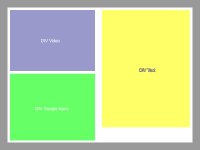
Der Dazugehörige Quellcode ist (im Kurzen) wie folgt:
[src=html4strict]<!DOCTYPE html>
<html xmlns="http://www.w3.org/1999/xhtml">
<head>
<meta http-equiv="Content-Type" content="text/html; charset=utf-8" />
<meta name="viewport" content="initial-scale=1.0, user-scalable=no" />
<style type="text/css">
body {
padding-top: 25px;
padding-bottom: 25px;
font-family: Verdana, Geneva, sans-serif;
background-color: #CCC;
}
h3 {
margin: 0px;
padding: 0px;
font-weight: bold;
}
#wrapper {
height: auto;
width: 75%;
margin-right: auto;
margin-left: auto;
padding: 15px;
background-color: #FFF;
min-width: 690px;
}
#player {
width: 49%;
min-width: 400px;
height: 320px;
float: left;
display: block;
margin-right: 2%;
margin-bottom: 2%;
background-color: #E7FEF9;
}
#daten {
width: 49%;
min-width: 400px;
float: left;
height: 320px;
padding-top: 5px;
margin-bottom: 2%;
background-color: #E7FEF9;
}
#map {
width: 49%;
min-width: 400px;
height: 320px;
float: left;
background-color: #E7FEF9;
}
h2 {
font-size: 115%;
font-weight: bold;
}
.desc {
margin-top: 25px;
margin-bottom: 25px;
}
</style>
</head>
<body>
<div id="wrapper">
<div id="player"> Video </div>
<div id="daten"> Text </div>
<div id="map" style="width: 49%; height: 320px"> Google Karte (Maps Api) </div>
<br style="clear:both">
</div>
</body>
</html>[/src]
Wenn ich die Seite jetzt verkleinere floaten die Elemente ja bei min-width von 400px unter einander. Das Problem ist nun das der Inhalt der Text-Box hinter den Inhalt der Video-Box rutscht. Habe hier am Ende mal ein <br style="clear:both"> eingefügt, hat nichts geholfen. Außerdem bleibt der Wrapper mit seiner 75% Breite ja auch erhalten.
Hat jemand eine Fixe Idee wie ich das elegant lösen könnte? Also das der Text nicht hinter die Video-Box rutscht und sich ggf. der Wapper auch noch auf die neue Breite von 400px (+ die paar Pixel Rahmen) anpasst? Irgendwie komme ich gerade nicht drauf
Gruß godlike
Bzw. Nachtrag: Die Idee war das beim schmalen Viewport von Smartphones die DIV-Boxen untereinander angeordnet werden und 100% des neuen Viewports einnehmen. Die Vorgehensweise ist insofern vielleicht sogar dämlich. Könnte ich das mit speziellen CSS-Styles besser lösen?


 Hab sie alle gelesen, bemerkt und gespeichert. Leider komme ich z.Z. nicht dazu da ich viel um die Ohren habe. Sobald es aber langt (vllt sogar morgen) werde ich hier Feedback geben. Danke aber das ich einige der Tipps für meine Idee toll verwursten kann